
New
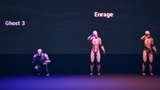
Ghost Exorcist Animation
Video - LinkList of Animation CategoryExorcist (10)SitAshWaterPrayerHit ReactStandPrayerCrossAttackShieldIn GroundCandleHit ReactGhost 1 (13)EnrageScreamBurnAttackRunGhost 2 (15)EnrageFlyLampScreamHurtBurnGhost 3 (15)EnrageFeedRunBurnAttackShow moreIncluded formatsUnreal EngineCompatibility and file informationUnreal Engine versions5.6 – 5.8Supported development platformsWindows, macOSDistribution methodAsset packageTarget platformsWindowsMacAndroidShow moreTagsZombieEnemyAnimationGhostCriticalExoticDangerousAnimatedFlyJumpDangerPitRiggedFireHorrorMore from NexaFrame Production24 results availableItems 0 to 2Horse Animation5.0(1)Casino Animation4.0(1)Cover Animations3.0(1)
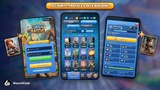
Clash Battle - Multiplayer Card Arena Template
commentsDescriptionClash Battle Template is a production-ready, server-authoritative real-time card battle game. It includes both the game template and the complete WebSocket server backend.Create your own Clash Royale-style game without wasting time creating code and mechanics from scratch.WebGL DemoDocumentationDiscord CommunityDeveloper's websiteWhat's included:Game Template:A complete battle system in the style of Clash Royale with troops, buildings and spells.21 demo cards, king and princess towers, crowns, overtime with double and triple elixir.Battles against other players or bots.Full meta-game: deck builder, card collection, upgrade system, lootboxes, shop with daily rotation.Server-authoritative battles with smooth client-side interpolation for both WebSocket and offline backends.Offline modeLogin (email/password + guest), profile, settings, nickname renameClan system with real-time chat, emotes, donations, member roles, search and clan war.Friends list with online status and friendly battlesLeaderboardsBattle PassTrophy RoadChest SlotsBattle emotes, victory animations, particle reward FXReplay SystemMatch history + replay viewerReal-time server data update system, exporting with just one click.Localization: English, Portuguese, Chinese, Japanese and Korean (LanguageManager, ready for more languages)Local + remote update flow (Google Play / App Store / custom JSON)Customization:Every game-design-related setting lives in the Editor as ScriptableObjects:Units (stats, AI, animations, costs)Maps + arenasLootbox reward tablesShop offers + rotationsCurrency definitionsBattle Pass / Trophy Road / Chest Slot rewardsClan rules + chat configThe documentation has step-by-step tutorials for creating a new arena and a new card.WebSocket Backend Server:Authoritative battle simulation at 20 ticks/sec (configurable) with delta-encoded state sync.REST + WebSocket APIs for auth, matchmaking, shop, IAP, clans, friends, telemetry.JWT auth with email/password + persistent guest accounts (device-id based).Real-money IAP with server-side receipt validation: Google Play Billing, Apple App Store StoreKit, Stripe Checkout / Payment Intents.Auto-reconnect for battle and lobby sockets.GM panel with ban / kick / grant currency / set trophies / search players.Real-time data push to clientTelemetry pipeline with crash aggregationMulti-region distributed scaling via Redis (optional)This asset uses the following third-party resources:LeanTweenLicense: MITAuthor: Russell Savage - Dented PixelUnityHFSMLicense: MITAuthor: InspiaaaColyseus Unity SDKLicense: MITAuthor: Endel DreyerMsgPack SerializationLicense: MITAuthor: Denis ZykovMeshCombineWizardLicense: MITAuthor: Gojko RadonjicUniTaskLicense: MITAuthor: Yoshifumi Kawai / Cysharp, Inc.VContainerLicense: MITAuthor: hadashiAUIEffectLicense: MITAuthor: mob-sakaiUIParticleLicense: MITAuthor: mob-sakaiOther assets, audio, 3D models, etc., are all under the CC0 license.Show moreIncluded formatsUnityCompatibility and file informationFile formatunitypackageFileclash_battle_multiplayer_card_arena_template.unitypackageFile size221.16 MBSupported development platformsWindowsRender pipelinesURPMinimum Unity versionUnity 6.xHas package dependenciesNoShow moreTagsMultiplayerDefenseFantasyCardTowerRoyaleClashStrategyMore from BizachiCode2 results availableItems 0 to 2BulletHell Elemental Template v1.6.1From $49.99Slingshot Squad | Template + EditorFrom $28.99
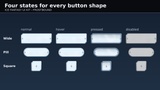
Ice Fantasy UI Kit - Frostbound (HD)
light kit: pale frosted glass with faint frost clouds, a polished silver-blue trim with a bevel, and corners cut like a crystal - long facets on two corners, short ones on the other two. Corners carry a frost star with rules running out to small crystals, and the studs are crystal prisms. The whole kit is generated from code as vector art rather than painted, so corner radii match across every element and stroke weights are identical at every size.It suits a winter level, a frost-magic class, a northern survival game, or a holiday event UI that should look cold without going dark.Every element is vector art and ships as an SVG master, which stays sharp at any size, plus PNGs at 1x, 2x and 4x rendered straight from it, so no scale is an upscale of another. 132 parts, every PNG RGBA with real alpha, and no text glyphs anywhere, so the kit localizes cleanly.What is inside:Panels (39): three variants - crystal, double, plain - at 256x256, 512x384 and 384x512, plus a full 9-slice set per variant: nine tiles, the reference they were cut from, and a slices.json giving the insets, center size, corner radius and minimum render sizeButtons (12): wide, square and pill, each in normal, hover, pressed and disabledItem slots (7): five rarities plus empty and locked, all on one footprint with a transparent icon windowStatus bars (24): horizontal, vertical and 10-segment, each as a complete frame, a hollow border and four separate color fillsCooldown rings (17): the ring frame plus eight sweep steps in two colorsToggles (6): checkbox, radio and switch, on and offSliders (4): track and knob, normal and disabledCursors (6): pointer shapesBadges (8): crystal, helm, icicle, mountain, northstar, pine, snowflake, windRibbons (3): banner headers in three widthsDividers and ornaments (6): icicle, snowflake, shards, frostline, plus corner ornamentsEngine notes. The Unity package imports every PNG as a Sprite with its 9-slice borders already set, so a panel drops into a Sliced Image and stretches correctly. The Unreal project holds the PNGs as Texture2D with UI settings; every panel's Box brush margins, as the fractions a Slate/UMG brush takes, are on the Unreal setup page at https://taproot-ue-packs.web.app/docs/frostbound-ui-kit.html . The SVG masters ship as the Additional File IceFantasyUIKitFrostbound_SVG_Masters.zip, an SVG_Masters folder, for any tool or pipeline that takes vector art or to render a scale of your own; neither engine imports them as they are, so they are in neither the Unity package nor the Unreal project.Fills are their own layer. Every bar ships three files: the complete frame, the same border with a transparent interior, and the fill on its own. Draw frame then fill, or fill then border - both orders work, so the fill can be tinted, masked to a percentage or scaled on one axis without touching the frame.9-slice tiles carry the body gradient but not the surface grain, so a stretched edge never steps against an unstretched corner. The standalone panel PNGs carry the full surface.Show moreIncluded formatsUnreal EngineUnityCompatibility and file informationUnreal Engine versions5.8Supported development platformsWindows, macOS, LinuxDistribution methodComplete projectTarget platformsWindowsMacLinuxShow moreAdditional files1 additional fileShow detailsTagsMenuHudFrostWinterInventorySpriteUserinterfaceIceSnowflakeInterfaceMore from TaprootSolutions24 results availableItems 0 to 2Free Particle VFX Sampler Vol. 1 - 5 Effects for Unity & UnrealFree Surface Decals - 5 PBR Decals for Unity & UnrealFree VFX Sampler Vol. 1 - 9 3D Mesh Effects
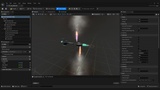
UE5 Premium Missile System (Armored Core Style)
& Tutorial Video: This asset package contains all of the required components to replicate FromSoftware's Armored Core Style Missile lock weapons system. It contains 4 distinct types of classic missile variants: Standard Homing, Intercept Homing, Vector-Thrust Homing, Intercept Vector-Thrust Homing. All assets are custom made and come preassembled out of the box. All assets are built upon a "Closest to the middle of the screen" lock system. Missile system comes ready and able to lock on to up to 12 targets at a single time. Sound FX, Static Meshes, Materials, Material Instances, Textures, Blueprints, and Niagara Particles are all custom and included in the sample project. Usage, installation, and explanation can all be found in the linked video above ~ Included formatsUnreal EngineCompatibility and file informationUnreal Engine versions5.8Supported development platformsWindowsDistribution methodAsset packageTarget platformsWindowsShow moreTagsModularModernScifiMetalFantasyAnimatedRealisticBlueprintMore from TheRoyalMarket24 results availableItems 0 to 2Unreal 5 Skeleton EDITOR (Maya)5.0(1)UE5: (Gundam Style) FUNNEL-Orbit Weapons5.0(2)UE5: Bullet, Muzzle-Flash, & Hit (Niagara Particles)
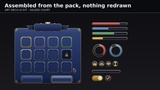
Art Deco UI Kit - Gilded Court (HD)
lacquer with fine gold pinstripes, a two-pixel polished gold frame, and notched corners cut square into every panel, button and slot. Corners carry a deco sunburst fan with stepped rules, and the studs are gold lozenges. The whole kit is generated from code as vector art rather than painted, so corner radii match across every element and stroke weights are identical at every size.It suits a casino or card game, a 1920s mystery, a luxury tycoon or hotel sim, or a noir detective story.Every element is vector art and ships as an SVG master, which stays sharp at any size, plus PNGs at 1x, 2x and 4x rendered straight from it, so no scale is an upscale of another. 132 parts, every PNG RGBA with real alpha, and no text glyphs anywhere, so the kit localizes cleanly.What is inside:Panels (39): three variants - double, gilded, plain - at 256x256, 512x384 and 384x512, plus a full 9-slice set per variant: nine tiles, the reference they were cut from, and a slices.json giving the insets, center size, corner radius and minimum render sizeButtons (12): wide, square and pill, each in normal, hover, pressed and disabledItem slots (7): five rarities plus empty and locked, all on one footprint with a transparent icon windowStatus bars (24): horizontal, vertical and 10-segment, each as a complete frame, a hollow border and four separate color fillsCooldown rings (17): the ring frame plus eight sweep steps in two colorsToggles (6): checkbox, radio and switch, on and offSliders (4): track and knob, normal and disabledCursors (6): pointer shapesBadges (8): crown, fan, gem, hourglass, key, laurel, spade, trophyRibbons (3): banner headers in three widthsDividers and ornaments (6): deco, sunburst, zigzag, lozenge, plus corner ornamentsEngine notes. The Unity package imports every PNG as a Sprite with its 9-slice borders already set, so a panel drops into a Sliced Image and stretches correctly. The Unreal project holds the PNGs as Texture2D with UI settings; every panel's Box brush margins, as the fractions a Slate/UMG brush takes, are on the Unreal setup page at https://taproot-ue-packs.web.app/docs/gilded-court-ui-kit.html . The SVG masters ship as the Additional File ArtDecoUIKitGildedCourt_SVG_Masters.zip, an SVG_Masters folder, for any tool or pipeline that takes vector art or to render a scale of your own; neither engine imports them as they are, so they are in neither the Unity package nor the Unreal project.Fills are their own layer. Every bar ships three files: the complete frame, the same border with a transparent interior, and the fill on its own. Draw frame then fill, or fill then border - both orders work, so the fill can be tinted, masked to a percentage or scaled on one axis without touching the frame.9-slice tiles carry the body gradient but not the surface grain, so a stretched edge never steps against an unstretched corner. The standalone panel PNGs carry the full surface.Show moreIncluded formatsUnreal EngineUnityCompatibility and file informationUnreal Engine versions5.8Supported development platformsWindows, macOS, LinuxDistribution methodComplete projectTarget platformsWindowsMacLinuxShow moreAdditional files1 additional fileShow detailsTagsLuxuryCasinoMenuCardHudGoldInventorySpriteUserinterfaceInterfaceMore from TaprootSolutions24 results availableItems 0 to 2Free Particle VFX Sampler Vol. 1 - 5 Effects for Unity & UnrealFree Surface Decals - 5 PBR Decals for Unity & UnrealFree VFX Sampler Vol. 1 - 9 3D Mesh Effects
Best
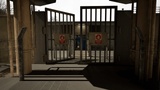
Modular Prison
concrete, steel and silence, time moves slower.Prison environment pack delivers a game-ready prison setting. The pack allows developers to create detailed interiors and exteriors - from tightly secured cell blocks to expansive outdoor yards. Perfect for survival and horror games.YOUTUBE VIDEO - Pack PreviewYOUTUBE VIDEO - Pack FeaturesUnique Meshes:80+ unique meshes, including: cell components, bunk beds, tables, toilets, showers, benches, stairs, phone booths, railings, constructive parts and yard props such as basketball hoops and fences. Example Level:Example prison level showcasing a complete two-story interior with rows of cells, a visitor area with phones, shower sections and a common space for inmates, is included. Outside, a detailed yard features a basketball court and walking area.Built on a modular system, every piece can be rearranged or expanded to suit your project. Contact:Email: info@dexsoft-games.comJoin our DISCORD server Note:Please enable the following options in Project settings: Virtual Textures Streaming Virtual Textures For Opacity MaskPlease enable the HDRI Sky plugin! HDRI sky is taken from free source (www.polyhaven.com)Some materials use textures taken from free PBR source (www.ambientcg.com)Show moreIncluded formatsUnreal EngineUEFNTechnical detailsTechnical Details:Number of Unique Meshes: 81Collision: Yes - automatically generatedLODs: YesNumber of LODs: 1-4 per modelNumber of Blueprints: 6Number of Materials: 7Number of Material Functions: 12 Number of Material Instances: 90Number of Textures: 212 (+HDRI texture cube)Texture Resolutions: up to 4KTexture Formats: TGA and PNGSupported Development Platforms:Windows: YesMac: NoCompatibilitySupported Unreal Engine Versions5.6 – 5.7Supported Target PlatformsWindowsPS4Xbox OneOculusAndroidSteamVR / HTC ViveWin32HTML5LinuxGear VRHoloLens 2Nintendo SwitchOther informationDistribution MethodAsset PackageTagsGateSurvivalJailModularVisitorYardInteriorChainPrisonCellHorrorPrisoner

Residential Buildings
Builidings Pack includes:BP_Building: blueprint allows you to easily build any shaped custom building and customize it17 pre-made customizable buildingsadditional roof meshes for custom-shaped roofColor Decal to apply custom wall colors for parts of buildingBP_Day_Night_Cycle to realistically move sun and switch window illumination on/off📖 Residential Builidings documentation▶️ Residential Buildings videoBP_Building features:17 pre-made buildingsConstruct your own custom building from 13 main mesh types and 8 additional mesh typesRandom windows illuminate at night, along with a light source at the entrance.Automatic rectangular roof with fence (more meshes included to manually make custom-shaped roofs)Roof propsBalcony props and peopleWorking air conditioners9 interior parallax images in windowsOption to change wall material to Bricks or your custom materialColor Decal to apply custom wall colors for parts of buildingGame-ready collisionExteriors only. No interiorsBP_Building blueprint is performance optimized:Air conditioning fan rotation by shaderWindows random switching on/off by shaderEach similar mesh throughout entire building is automatically instancedWindows do not use transparent shader (Glazed Loggia is exception)Custom game-ready collision for each meshEficcient LODs are used for each meshBP_Day_Night_Cycle controls:Sun movement. Sun moves realistically from East to West depending on Latitude and Season TiltBuildings’ windows light. Buildings’ windows begin to light up shortly before sunset and most of windows are illuminated at evening. Small amount of windows is left lit through the night till sunrise. Windows are randomly switched on/off realistically.Other actors with BPI_Light_Control interface. You have to add interface to any blueprints you would like to switch on/off at day/nightMoon at nightTime of Day passes with set speed, with ability to set Time of Day or Fast Skip TIme.Each mesh feature:High quality geometry and UVsPolycount is enough for HQ ArchViz but made with performance in mind. No unnecessary polygons.Efficient LODs appliedCorrect lightmap UVsReady for Baked lighting, Lumen, Mobile, Path TracingGame-ready collisionMaterials are customizableReal world scaleUpdate 02/2025: performance improvement. Switched from Nanite to LODs proved to be more efficient in large worlds. Added Moon to DayNightCycle. Bugfixes.Update 03/2025: townhouse entrance and garage door added; 2 new buildings: townhouse big townhouse smallUpdate 04/2025: brick wall material added; custom wall material slotOverview map with buildings is included.City from screenshots is not included.Discord support serverShow moreIncluded formatsUnreal EngineTagsRetroPbrStreetCustomizableModularModernResidentialDowntownHousePhotorealisticBackgroundResidenceProceduralScriptEnvironmentCityscapeRealisticBuildingPropBlueprintCityApartment
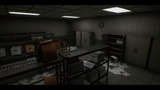
Abandoned Police Department
collection of several PBR Props and Modular pieces for an abandoned Police Department.It includes a Demo scene, which includes the modular pieces set together, also it features the building with the first floor filled with props.It also includes an overview scene showcasing all the props and pieces in this pack.Abandoned Police Department Demo Map Video ShowcaseAbandoned Police Department Overview Map Video ShowcaseUpdate 2.0 (16.11.2021):The long awaited and promised update is finally here.Redesigned from the ground up with better modularity, quality and quantity!If you like the update, please consider leaving a review, it helps a ton!If you have any questions or suggestions, please don't hesitate to reach out.Important note: Included formatsUnreal EngineTechnical detailsFeatures: Modular Set of structures to build your own designsDoor (Pivot Set for rotation). *Basic Open/Close Door BP included Over 150 high detailed Props VertexPaint SetupHigh Quality texturesHighly optimized for gamesSeparate Glass MeshesTexture Sizes: 512-2kCollision: Yes (CustomMade)Tris Count: Range between 40924~8.Vertex Count: 5484~24LODs: NoNumber of Meshes:Over 50 Modular Pieces5 Door Types and 4 Windows typesOver 140 PropsNumber of Materials and Material Instances: 11 Master Materials and 78 Material InstancesNumber of Textures: 234Supported Development Platforms: WindowsSupported Target Build Platforms: Window TestedCompatibilitySupported Unreal Engine Versions4.24 – 4.27 and 5.0 – 5.6Supported Target PlatformsWindowsOther informationLast update08/20/2025Distribution MethodAsset PackageTagsStationPostAbandonedJailModularPoliceOffice
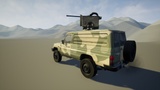
Driveable Vehicle : 4X4 SUV
working 4x4 vehicleIt can be used in any game or project, the physics of the vehicle is realistic, it has active suspension, also included in the project is a destroyed version of the vehicle.Vehicle is built from scratch.Breakdown ( will be available shortly )Custom character integration ( please follow instructions no matter which vehicle is in use )Demo ( UE4 physics )Try it before you get it, if you like it tell me why if you don't like it then especially tell me why I will improve the vehicle.Thank you :)Disclaimer:Vehicle in UE5 is using Chaos Vehicle Plugin. If plugin is disabled, enable it in your project.Navigate to Edit\Plugins and search for Chaos Vehicle Plugin, and enable it.Show moreIncluded formatsUnreal EngineTechnical detailsFully functional vehicle with damage model, and cockpit, including all of the sounds (engine, transmission etc.) and particle effects (muzzle flashes, ejection of shell, etc.).Realistic physics with active suspensionWorking doors, working turret and gun, working gaugesMultiple skins woodland, desert, digital desert, red, white yellow and blackCustomization to the model directly from Blueprints: detach turret, hide back tire, hide air intake, change skinsMultiple camera locationsWorking HUD/health system.Main textures for body, cockpit and skins : 4096 x 4096 Occlusion, Roughness, Metallic merged in one texture Turret texture and turret skins : 2048 x 2048 Occlusion, Roughness, Metallic merged in one texture Machine gun textures : 2048 x 2048Tire texture : 2048 x 2048 Roughness, Metallic merged in one texture Misc. textures ( lights emissive, glass etc.) : from 128 x 128 to 512 x 512The vehicle is not associated with any real-life vehicle, there are no logos or naming of real-life vehicle CompatibilitySupported Unreal Engine Versions4.24 – 4.27 and 5.0 – 5.7Supported Target PlatformsWin32WindowsOther informationDistribution MethodComplete ProjectTagsVehicleCarDrivableScriptTruck4x4BlueprintMore from EA3D23 results availableItems 0 to 2Driveable Vehicle Pack ( REDUX ) 2.04.7(93)Driveable Vehicle : UH - H60 Ghost Hawk5.0(3)USS CVN Supercarrier5.0(6)
Blood: Additional Splashes And Washed
Popular
Sci-Fi Hydra
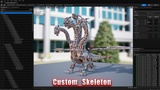
DISCORD 🎁 - we have a lot of interesting things thereLINK PREVIEWThe perfect solution for your project✅We're done working on the Ancient Greek characters pack - characters Pack will contain 5 game-ready characters 4/5 characters*sound, FX not included, just demo*Character has Custom skeleton (Image skeleton preview included)4 skins.Inst Mat color blending for each skin58 animation includedAttack - 13Idle - 3Death - 3Fall - 3KnockOut - 4Gethit - 18Turn 90 - 4Turn 180 - 2Walk - 3Idle Transitions - 2Provoke - 1Character:Triangles: 123 133Vertices: 92 005Show moreIncluded formatsUnreal EngineTechnical detailsRigged: YesRigged to Epic skeleton: NoAnimated: YesNumber of Animations: 58Animation Types (Root Motion/In-place): 0/58Number of Characters: 1 (4 skins options)Vertex counts of characters: 92 005Number of Materials and Material Instances: 24Number of Textures: 44Texture Resolutions: 4096x4096, 2048x2048Supported Development Platforms:Windows: YesMac: YesCompatibilitySupported Unreal Engine Versions4.26 – 4.27 and 5.0 – 5.7Supported Target PlatformsMacWindowsLinuxWin32Other informationDistribution MethodAsset PackageTagsBeastEnemyUndeadScifiFantasyScriptRobotNpcRpgDragonMechWyvernMechaMonsterMilitaryBossAnimationblueprintMore from Shumniy23 results availableItems 0 to 2Sci-Fi Boss Pack5.0(3)SciFi Dinosaurs Pack5.0(2)Sci-Fi Animals Pack Vol. 15.0(1)
HB Mech
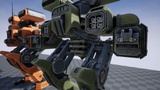
Mech of my own design. Includes Blueprints for the Player Pawn and Weapons as required to have a basic functional character with functioning weapons systems. Materials include custom paint or decal layers or both. Includes a template you can export for painting. All basic animations are included. Mostly animations are achieved with blending poses, but walking and running are fully animated. Also includes the Animation Blueprint and Physics Asset. Some simple particle effects are included for the weapons and various effects.(Demo Video)Included formatsUnreal EngineTagsScifiScriptRobotMechAnimationblueprint
Mech Sound Effects
the power of machines with the "Mech Sound Effects" pack, a must-have for game developers, filmmakers, and sound designers. This comprehensive collection features 219 meticulously crafted sound effects, ready to infuse your projects with the authentic sounds of robotic movement.From the subtle whir of servos and the heavy clank of metal limbs to the dramatic, intricate sounds of transformations and the powerful hiss of hydraulics, this pack captures every nuance of mechanized motion. Elevate your scenes with realistic and immersive audio that brings futuristic worlds to life.Preview HEREIncluded formatsUnreal EngineTechnical detailsNumber of Audio Waves: 219Number of Audio Cues: 219Sample rate / bit rate: 44,100 Hz/16 BitDo Sound FX loop: YesSupported Development Platforms: Windows: Yes Mac: YesCompatibilitySupported Unreal Engine Versions5.4Supported Target PlatformsXbox OneWindowsOculusNintendo SwitchMacPS4SteamVR / HTC ViveWin32LinuxiOSHTML5HoloLens 2Gear VRAndroidOther informationLast update10/10/2024Distribution MethodAsset PackageTagsMachineRoboticMechanicalRobotMechMore from Gravity Sound24 results availableItems 0 to 1Spaceship Sound EffectsConstruction Sound Effects
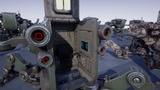
SCI FI: QUADRAPED MECH
inside Sci Fi Characters Mega Pack Vol 2 and upcoming Sci Fi Robots Pack Vol 2***Here is a quadraped mech. This unit is perfect for battles requiring big fire power. It can be used as an enemy or a vehicle in your Sci Fi project.Geometry is 39.58 Ktris. Rig is 67 bones. Model uses 2 materials: mech and cockpit, with respectively, 4096*4096 and 2048*2048 PBR texture set.3Weapons are included (gatlin gun, cannon and missile rack). Each weapon uses 1 material with a 2048*2048 PBR texture set.The pack includes a set of 24 animations (8 being root motion variations).Real Time 3D ViewerIncluded formatsUnreal EngineUnityTagsCharacterEnemyLowpolyShooterFantasyScriptRobotRealisticMechWeaponAnimationblueprint
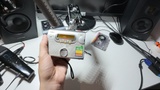
Personal Cassette Player SFX
PREVIEWRecording Session SamplePersonal Cassette Player SFX is a collection of 49 high-quality sound effects captured from a vintage Sony Walkman-style cassette player, delivering an authentic analog aesthetic perfect for Foley, game audio, film, and sound design. The library is organized into 10 clearly structured folders, each focusing on a specific action or mechanical behavior of the cassette player.Beyond the core mechanisms, the pack also includes radio dial tuning, tape hiss, and song rewind effects for added versatility.All sounds were recorded with two perspectives to provide tonal flexibility:• Close-up omni recordings using Clippy EM272 microphones for detailed mechanical texture.• More distant perspective captured with a RØDE NTG3 shotgun microphone for a natural, spatial characterShow moreIncluded formatsUnreal EngineTechnical detailsNumber of Audio Wavs: 49Number of Audio Cues: 49Number of MetaSoundsSample Rate / Bit Rate: 24 bits 96 khzDoes Audio Loop: NoMinutes of Audio Provided: 5:21Supported Development Platforms:Windows: YesMac: YesCompatibilitySupported Unreal Engine Versions5.6 – 5.7Supported Target PlatformsWindowsMacPS4iOSAndroidXbox OneOculusSteamVR / HTC ViveGear VRHTML5LinuxWin32HoloLens 2Nintendo SwitchOther informationDistribution MethodAsset PackageTagsRetroTapeButtonPortablePlayCassetteStopClickDeviceRecordAnalogMechanicalStereoVintageHeadphonesOldRadioMechInsertPersonal1980sSwitchMore from Asak SFX20 results availableItems 0 to 2Cinematic Punch SFX Pack5.0(1)Male Breathe5.0(1)Fire SFX Pack